API tokens
An API token lets another tool read your testimonials, and change them if you allow it. You choose what each token can do, and you can turn it off at any time.
Before you start
You need to be an Owner or Admin.
API tokens depend on your plan. If New token is greyed out, a message under it links to your options. See Plans overview.
Find out what the tool needs to do, so you can give it only that.
Create a token
In Settings, click API tokens.
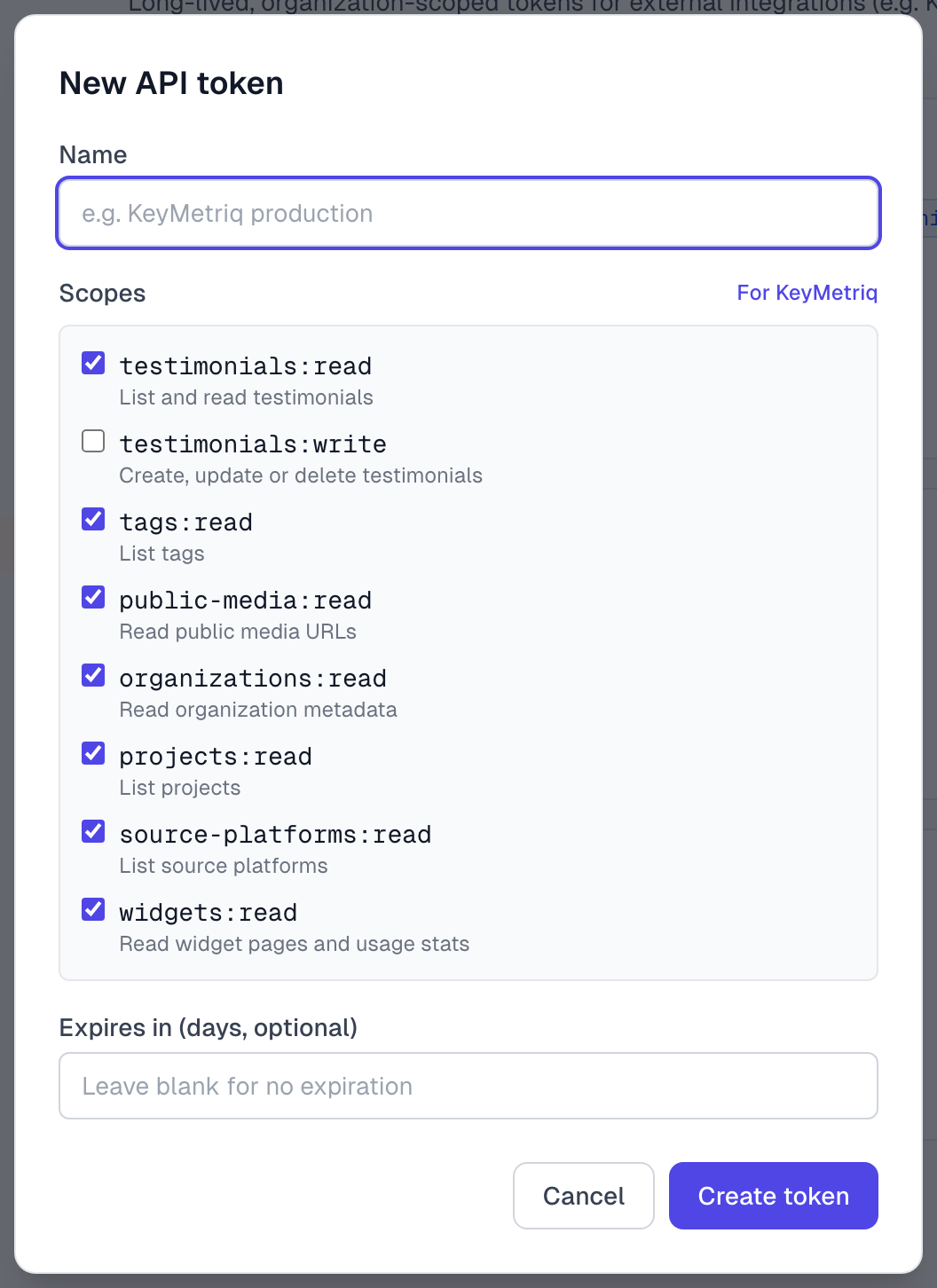
Click New token.
Give it a Name that says what it is for.
Under Scopes, untick anything the tool does not need. For KeyMetriq, click For KeyMetriq instead.
To make it stop working by itself, enter a number from 1 to 3650 in Expires in (days, optional). Leave it blank and it lasts until you revoke it.
Click Create token.
Click Copy, and put the token in the other tool or a password manager.
Click Done.
You see the token only once. We keep a scrambled version that cannot be turned back into the token, so nobody can show it to you again. If you lose it, revoke it and create another.
Keep tokens safe
A token works like a password for your whole organization, and anyone who has it can use it. Do not put it in an email, a chat or a web page, or in code that visitors can see.
What each scope allows
Scope | The tool can |
|---|---|
testimonials:read | List, read and search testimonials, and list projects |
testimonials:write | Change or delete testimonials |
tags:read | List tags |
public-media:read | Nothing yet. The For KeyMetriq choice ticks it, but no part of the API needs it today. |
organizations:read | Read your organization's details |
projects:read | List projects |
source-platforms:read | List your sources |
widgets:read | Read widget pages and usage stats |
testimonials:write starts unticked, and everything else starts ticked. Tick it only if the tool really has to change or delete testimonials. The dialog also says it can create testimonials, but a token cannot do that today.
Tokens see real author details. A tool reading testimonials gets the author's real name and email, even on an Approved (Anonymous) testimonial. Make sure the tool does not publish them.
You cannot change a token's scopes later. Revoke it and create a new one.
Use a token
Give the token to the tool's settings, or to your developer. It goes in the Authorization header of each request:
Authorization: Bearer YOUR_TOKENThe token already says which organization it belongs to, so a request needs no organization ID.
Check your tokens
Each token shows its scopes, when it was last used and from what IP address, who created it and when it expires.
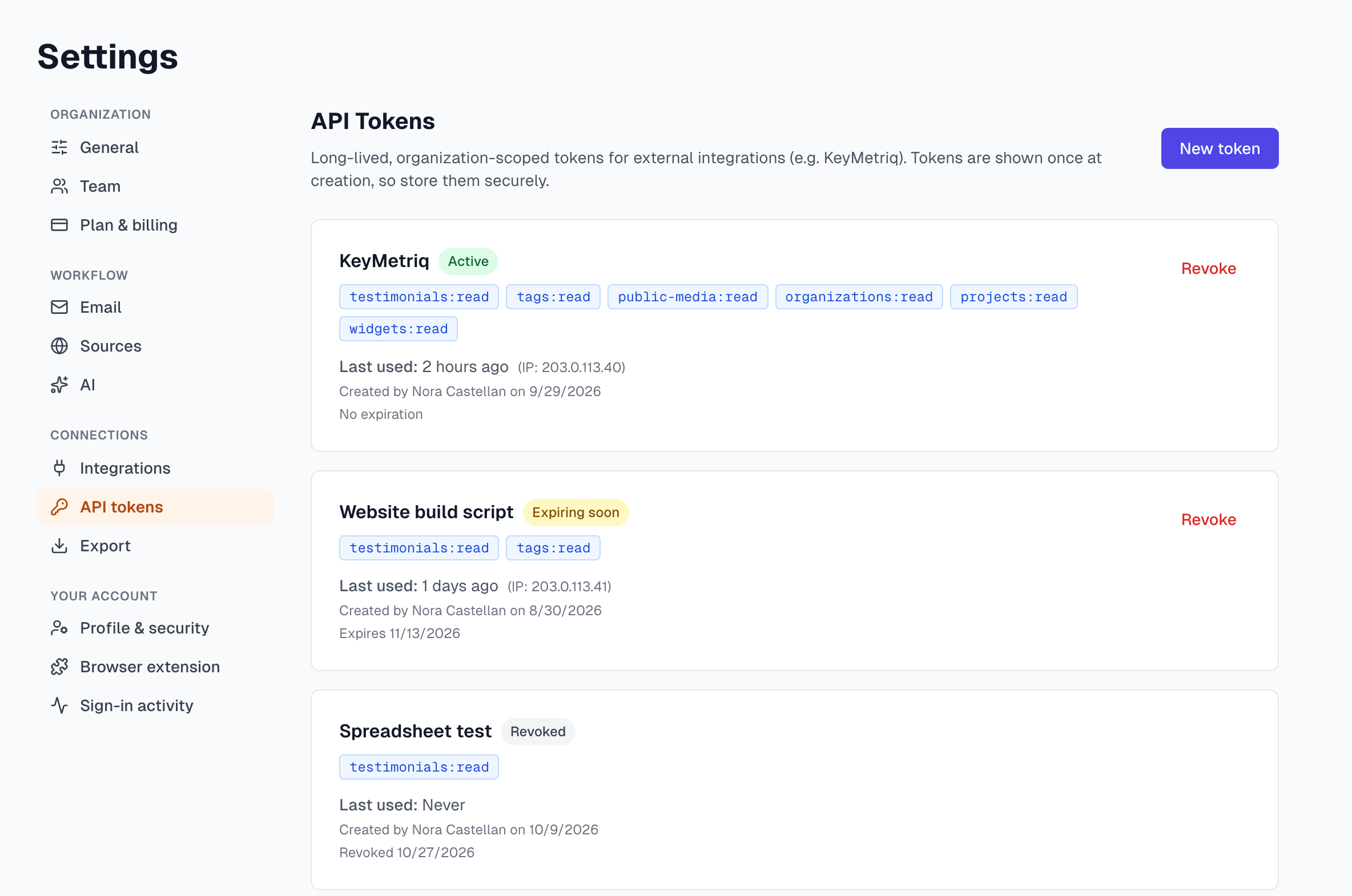
The badge says | What it means |
|---|---|
Active | It works. |
Expiring soon | It stops working within 7 days. |
Expired | It stopped on its expiry date. Create a new one. |
Revoked | Someone turned it off. It stays on the list for your records. |
Revoke a token
Click Revoke on the token.
Click Revoke to confirm.
It stops working straight away, and so does any tool using it. This cannot be undone.
Good habits
Use one token per tool, so you can turn off one without touching the others.
Set an expiry on anything temporary. A test that needs a week gets a 7 day token.
When someone leaves, revoke the tokens they created.
A token that says Last used: Never after months can probably go.
If something goes wrong
The tool says This API token has been revoked or This API token has expired
Create a new token and give it to the tool.
The tool says Invalid API token
It was probably copied wrongly. If you no longer have it, revoke it and create a new one.
The tool says Required, followed by a scope name
The token is missing that scope. Revoke it and create a new one with the scope ticked. A message saying the endpoint is not available to API tokens means no scope opens that part of the app.
The tool reports a plan restriction
Your plan does not include API access. Existing tokens stay on the list but stop working until it does. See Plans overview.
The tool says Too many requests
Each token has a limit per minute. Have the tool slow down and try again.
I closed the dialog before copying the token
It cannot be shown again. Revoke it and create a new one.
Last updated