Multi-project workflow
If you run several products, programs or clients, a default project and a few filters keep each testimonial in the right place. Everyone on your team sees every project, so this is about habits and views rather than access.
What the default project does
The default project is the project the browser extension selects for you. It helps only with captures from the extension:
The extension's Project menu starts on your default project.
If you leave that menu empty, Capture Region still uses the default project. Capture Full Page does not, so that capture has no project.
After you use Capture Region with another project, the menu stays on that project. It does not go back to the default by itself, so check it before you capture.
CSV imports and videos on the Upload page ignore the default. They have no project unless you choose one.
Set the default
You need to be an Owner or Admin.
Click Projects in the sidebar.
Click Set default in the project's row. The project now shows a Default badge.
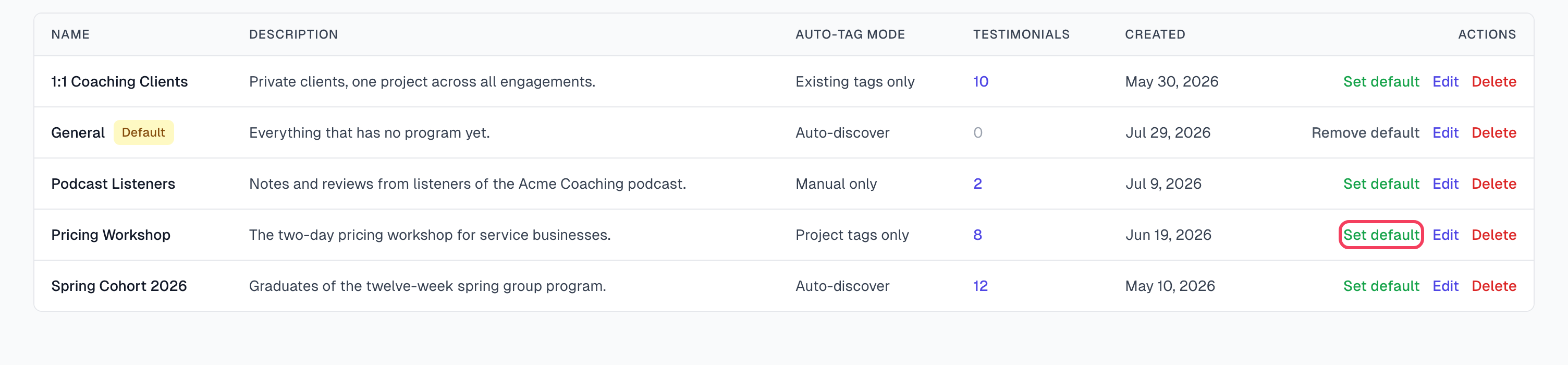
Remove the default
Click Remove default in the project's row. Captures then have no project unless someone chooses one.
Work in one project
There is no switch for an active project. Each page shows every project, and you narrow it with a filter.
Click Testimonials in the sidebar.
Choose your project in the All Projects filter.
Add any other filters. For one project's Inbox, set the status filter to Inbox.
Bookmark the page. The bookmark opens the same filtered view.
Elsewhere in the app:
Inbox has no project filter, but each row shows its project.
Advanced search has no project filter.
Settings > Export has a Project filter. See Export and use your testimonials.
Widgets can show one project. See Create a widget.
Move testimonials between projects
Open the testimonial.
In the Project card, choose the new project. It saves by itself.
There is no way to move many at once, so repeat this for each one. The filter from the steps above shows you what is left.
A move keeps the testimonial's tags and does not run AI again. Importing a CSV into another project is not a move: it creates new testimonials and uses AI captures.
What each project keeps to itself
Its own: name, description, Auto-tag mode and Assigned tags. See AI tag mode per project.
Shared by all projects: your tag list, permission emails, your team and your monthly AI captures.
Working with teammates
Different people look after different projects. Filter by project, bookmark the page and share the link with your teammate.
One person reviews everything. Use the Inbox with no filter.
You want to hide a project from someone. This is not possible. Everyone in your organization sees every project.
Good habits
Keep it small. Two or three projects cover most organizations, and five or more starts to feel like overhead.
Use tags for finer slicing inside a project.
Make your busiest project the default. It saves the most clicks.
If something goes wrong
A capture went into the wrong project
The extension may have kept the last project you used. Move the testimonial with the Project card, and check the menu next time.
I set a new default, but the extension still shows another project
It stays on the project you last used with Capture Region. Choose the new default in the Project menu.
New testimonials have no project
Imports and uploaded videos do not use the default. A capture has no project if the menu is empty and you have no default, or if the menu is empty and you used Capture Full Page. Add the project with the Project card.
Last updated