Find emails in bulk
Run sync searches your connected source for every author with a missing email and gives you one list to review. It suits a big import or a backlog.
Run the search
You need to be an Owner or Admin.
On the Permissions page, click Find author emails.
Check Missing Email, the number of named authors without an email.
Click Run sync, then Run sync in the dialog.
Wait, then refresh the page to see results. It does not update by itself, and a long list can take a while.
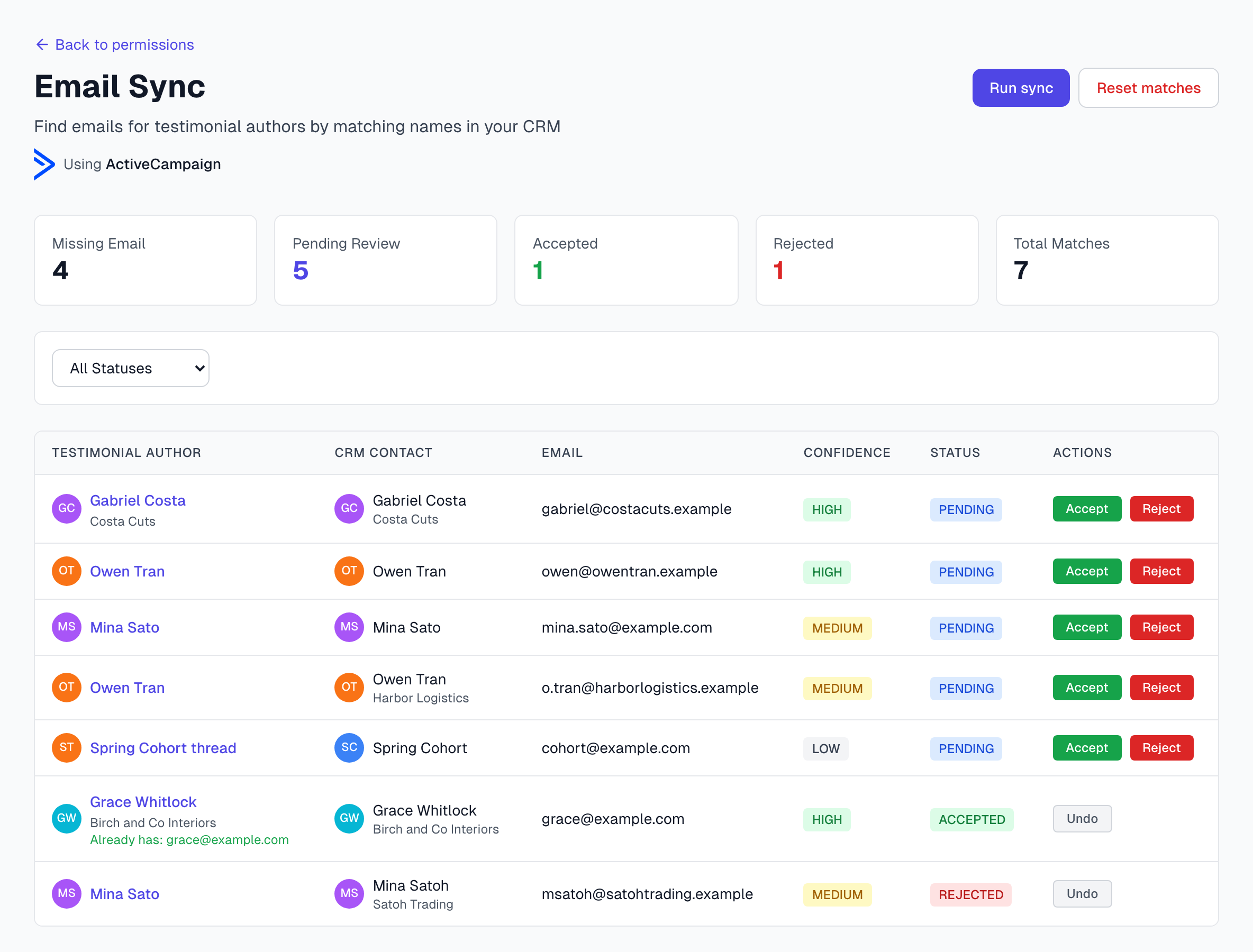
Each run covers up to 500 testimonials, newest first. It skips authors with only one name and any testimonial that already has a suggestion waiting for review. If your list is longer, review what came back and run it again.
Review the suggestions
Anyone on your team can do this.
Set the status menu to Pending Review.
Compare Testimonial Author with CRM Contact, and check the Email.
Click Accept to put the email on the testimonial, or Reject if it is the wrong person.
Accepting one contact rejects the other suggestions for that testimonial. See Email conflicts.
Undo puts a suggestion back in review. Undoing an accept also clears the email from the testimonial and brings back every rejected suggestion for it.
Already has: beside an author means the testimonial has an email. If that row is still pending, Accept replaces the email. Reject the row if you want to keep the one you have.
Send your requests
Once the emails are in, send your requests. See Sending permission requests in batches.
Run it again
It is safe to run more than once. A contact you rejected stays rejected. A testimonial that has an email is skipped.
Start over
Reset matches deletes every pending, rejected and stale suggestion, so the next run starts clean. Accepted ones stay, and so do their emails. This cannot be undone.
The app no longer marks new suggestions as Stale, so you should have few or none.
Good habits
Review HIGH first, then spend your time on MEDIUM and LOW.
Before you reject a MEDIUM, check the company. It is often the right person.
Run it after each CSV import.
If something goes wrong
I do not see Run sync
You are a Member, or no source is connected. Members can review but not start a run.
Other problems are in Find author emails troubleshooting.
Last updated