Declined permissions
When an author clicks No, don't use this, the testimonial is archived and cannot go live in your widgets. The answer stays on record, and an Owner or Admin can ask the author again if they change their mind.
What happens
The request shows Declined on the Permissions page. The Permission card shows Denied, and its Activity list shows Permission denied with the date.
The testimonial moves to Archived.
The send button is gone, and the row has no Resend or Delete. An answered request cannot be deleted, so the No stays on record.
The consent page does not ask for a reason, so you will not see one. To review how often this happens, filter the Permissions page by Declined.
What Declined blocks
A declined testimonial cannot go live in your widgets. Even if you click Move to Inbox and then Approve, it stays Hidden. The bulk approve buttons leave it Hidden too.
What Declined does not block
Exports. JSON, CSV and Full Backup include declined testimonials unless you filter them out. See Export and use.
Anything you copy out by hand is up to you. Keep declined testimonials for internal use, such as product feedback, and do not publish or share them.
Keep it or delete it
Archived is the safest place for it. It keeps a record of the answer, so nobody asks the author again by accident.
Deleting the testimonial removes its permission record too. See Bulk actions.
If the author changes their mind
The author cannot change their answer on the consent page. If they tell you they want to answer again, an Owner or Admin can send them a new request with Ask again:
Contact them personally first, outside the app, so the new email is expected.
If their email address has changed, correct the Author Email on the testimonial first.
Click Permissions in the sidebar and find the row that says Declined.
Click Ask again in the row.
Read the dialog. It names the address the new request goes to. Click Ask again.
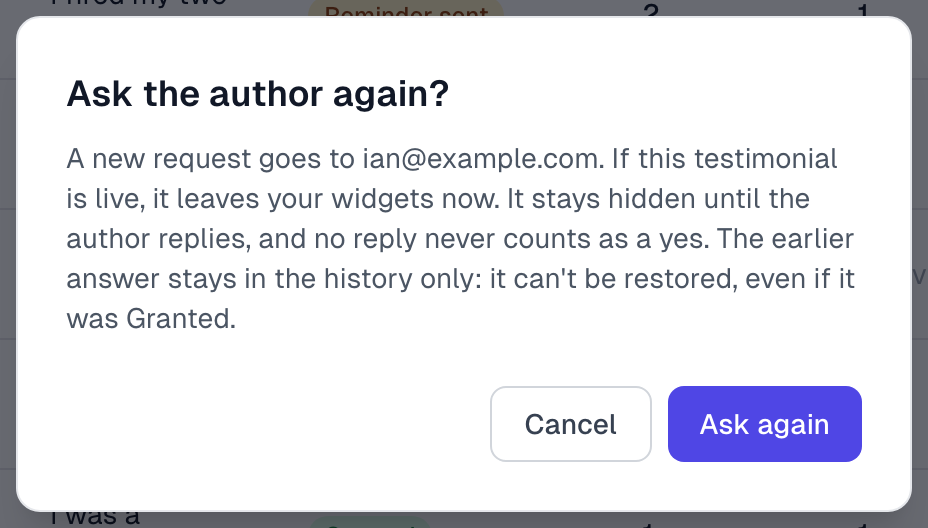
What happens next:
The author gets a new permission email with a link to the consent page, where they can answer again.
If the testimonial is Archived, it moves back to your Inbox. Either way it stays Hidden until they reply. It cannot be approved meanwhile, and no reply never counts as a yes.
The row shows Not sent yet until the email goes out, then Waiting for reply, with Earlier answer: Declined under it. The earlier answer stays in the testimonial's history, but it cannot be restored.
Their new answer replaces the No, as if it were their first answer.

Ask again is refused if the address bounced, was marked as spam or unsubscribed. Correct the author's email first. An address that bounced or was marked as spam stays blocked, even if you change the email back later.
Good habits
Do not send requests again a month later as a routine. It annoys people and damages trust.
Never ask a group of decliners again in one go.
People decline for many reasons, such as employer policy or privacy. A sudden rise can mean a problem with your email or sender name.
If something goes wrong
The author says they clicked the wrong button
Confirm it with them directly, then use Ask again as above.
I do not see Ask again
Only an Owner or Admin can ask again. See Roles and permissions.
I approved a declined testimonial and it says Hidden
That is expected. To undo the approval, click Archive.
Last updated