Advanced search
Search your library by what people said, not only by who said it. Advanced search looks through the words and meaning of your testimonials, and the search box on the Testimonials page finds an author or company.
Two ways to search
Where | What it does | Best for |
|---|---|---|
Search box on the Testimonials page | Matches part of an author's name or company | Finding one person's testimonial |
Advanced search | Searches the words and meaning of your testimonials | Finding a topic or theme |
Search by content
Click Testimonials in the sidebar, then Advanced search.
Describe what you want in plain words, such as "customers who loved the coaching" or "reviews about time savings". Results appear as you type, once you have 2 characters.
Narrow the results with Status and Tags if you need to.
Click a result to open the testimonial.
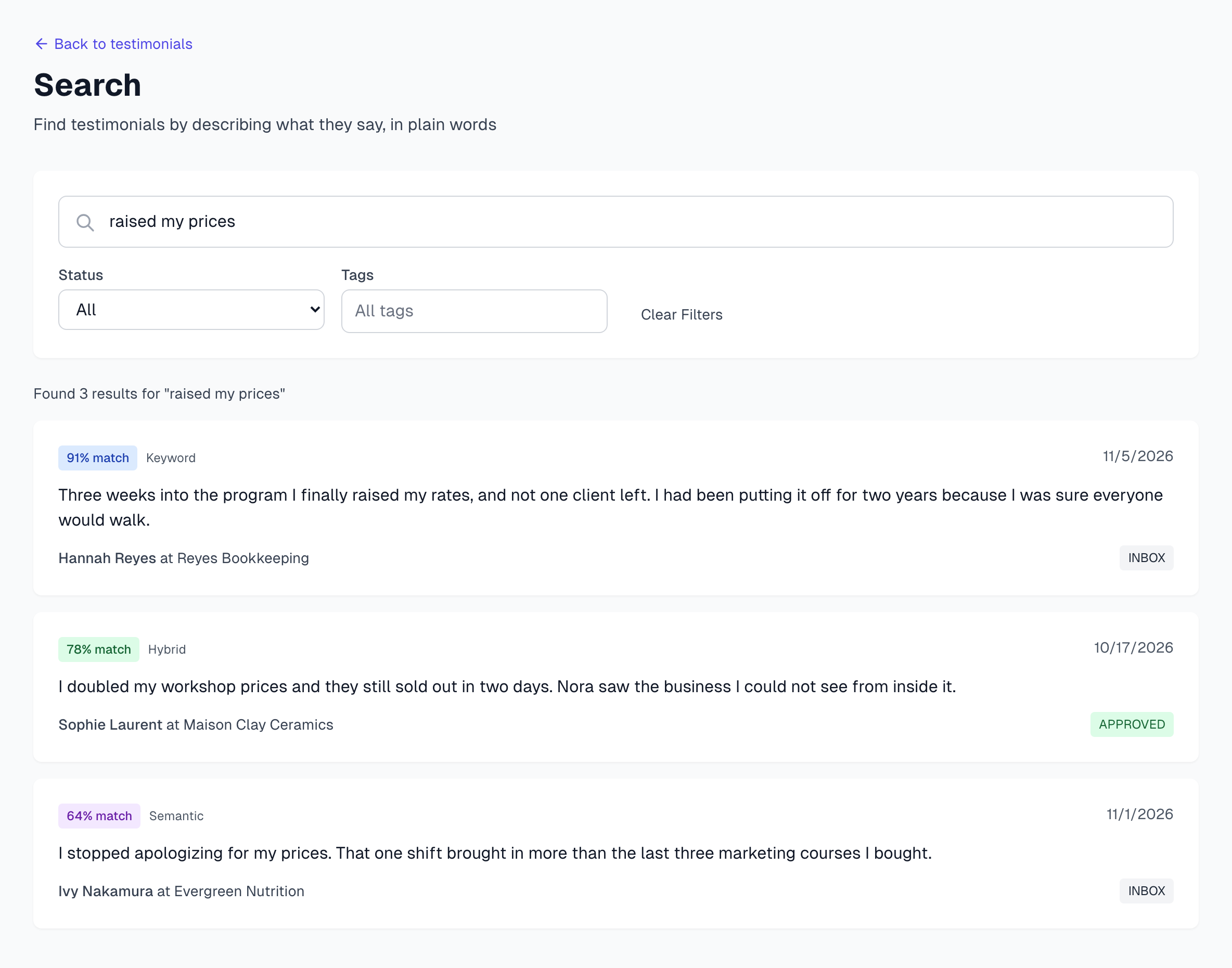
Each result shows a match percentage, how it matched, the date, the start of the text, the author and the status. The best matches come first, whatever their age, and you see up to 20. How search works explains the Keyword, Semantic and Hybrid labels.
Use the filters
Status: shows one status at a time.
Tags: shows testimonials with any of the tags you choose.
Clear Filters: resets both and keeps what you typed.
Your words and filters work together. For example, search for "loved the support" with Status set to Approved to see only approved testimonials on that theme.
Advanced search has no project filter. To stay inside one project, use All Projects on the Testimonials page.
Search by author or company
Click Testimonials in the sidebar.
Type part of the name in the search box. For example, "acm" finds Acme Corp.
Press Enter or click Search. Click Clear when you are done.
Advanced search finds authors and companies too, which helps when you also want to search the text.
Tips
Too many results? Add a filter. Too few? Try a shorter or broader phrase.
If you already have one good testimonial, Similar testimonials is often faster.
Want them in date order? The Testimonials page lists the newest first.
If something goes wrong
It says Too many search requests
Each pause in your typing runs a search, and there is a limit per minute. Wait a minute and try again.
It says search failed, or nothing appears
Check that you typed at least 2 characters, then try again. If it keeps failing, reload the page and check that you are still logged in.
A testimonial exists but does not appear
Clear your filters and search again. Matching on meaning cannot find a testimonial until AI has finished with it.
Last updated