General settings
What each General setting does in Magic Testimonials, where the other settings are, and how to delete your organization.
Setting up for the first time? Organization settings has the quick steps. This article explains what each setting on General does.
What each setting does
Click Settings at the bottom of the sidebar. General opens first. Click Save changes at the bottom of the page when you are done.
Organization Name: testimonial authors see this in your permission emails. Changing it does not change your links, testimonials or other data.
Support Email: required. Authors see it on the permission page and in permission emails as the contact for questions. You cannot send a permission request without it. Replies to the email itself do not come here. They go to your From address, as From address explains.
Timezone: this is saved with your organization, but it has no effect today. It does not change how dates appear.
Anonymous Display Name: replaces the author's name when they ask to stay anonymous. It appears in your widgets, and authors see it in the permission email. The default is Verified Customer.
Logo: see Branding.
Where the other settings are
The menu on the left of Settings has four groups:
Organization: General, Team and Plan & billing.
Connections: Integrations, API tokens and Export.
Your account: Profile & security, Browser extension and Sign-in activity.
Your mailing address is under Email. Members see only Sources and the Your account group. Roles and permissions has the full list.
Delete your organization
This removes every testimonial, project, tag, integration and email template, plus all member access. It cannot be undone, so make a Full Backup first. See Export your data.
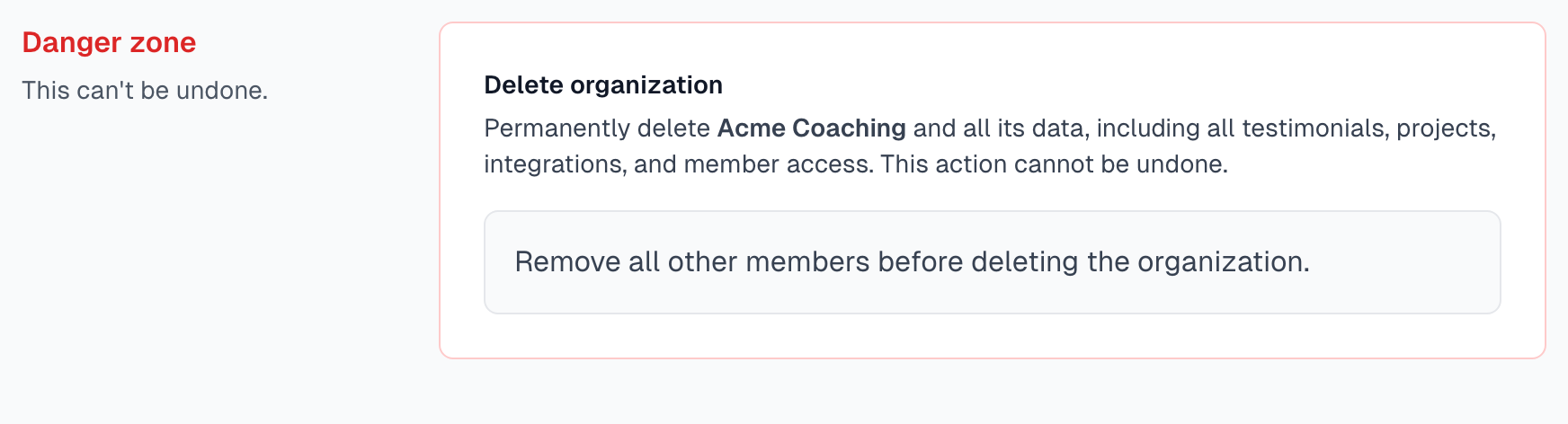
Only an Owner sees this section, and you must be the last member. Remove everyone else first. See Managing members.
Scroll to Danger zone at the bottom of General.
Click Delete Organization.
Type your organization name.
Click I understand, delete this organization.
A paid plan ends at once and is not refunded automatically. If you belong to no other organization, your user account is deleted too.
If something goes wrong
Support email is required
Your changes do not save without a Support Email. Add one and click Save changes again.
I do not see General
Your role is Member. Settings opens on Profile & security instead. Ask an Owner or Admin to make the change, or to change your role.
I want dates in my own timezone
The Timezone setting will not do this. Dates in the app come from your own computer in most places.
Last updated